
Zero to Live: Building My First Personal Website
🚀 I Built My First Personal Website. Here’s Everything I Learned
After months of thinking about it I finally did it. My personal branding website is now live at www.surajkofficial.com.. To be honest the journey of building it taught me more than I expected.
As a marketer having a personal website is not just a nice thing to have anymore. It is my storefront. It is where my work speaks before I do. So I decided to stop putting it off and build one from scratch. Without hiring a developer.
Here’s a full breakdown of how I did it the tools I used and what I learned along the way.
🎨 Step 1: Wireframing with Figma
Before I even started building my website I sat down with Figma. Mapped out exactly what I wanted. I made a plan for my website. Wireframing first was a game-changer. It forced me to think through the user experience. What sections do I need for my website? What’s the flow? What goes above the fold? Figma made it incredibly easy to sketch out layouts, experiment with structure and iterate quickly without wasting hours rearranging content on my personal website.
If you’re building a website and you’re skipping this step. Don’t. Plan before you build your website.
🌐 Step 2: Building with WordPress + Elementor
For the build I went with WordPress paired with the Elementor page builder plugin. I chose WordPress for my website because its flexible widely supported and perfect for someone who wants full control without writing code for their personal website.. Elementor made the whole drag-and-drop experience smooth and intuitive. I could see my changes in time which made it easy to align the final product with my Figma wireframe for my personal website.
For the contact form I used WPForms. Reliable and it integrated seamlessly with the rest of my personal website. Getting that form up and running took than 15 minutes.
🔍 Step 3: Getting the Design Details Right
This is where things got really interesting. Design isn’t about layout. It’s about colours and typography and I wanted mine to feel intentional and professional on my personal website.
Two Chrome extensions made this process much easier for my personal website:
Color Picker — Eyedropper Tool. Whenever I came across a website with a colour palette I admired I could just hover and pick the exact hex code. No more. Trying to eyeball shades. This extension helped me build a colour palette that felt authentically “me” for my personal website.
Rendered Font Picker. Typography is something most people overlook. As a marketer I know how much it affects perception. This extension let me hover over any text on any website and instantly identify the font being used. It helped me understand what makes certain sites feel premium.. Apply those learnings to my own personal website.
These two tools alone saved me hours of design research for my website.
🖥️ Step 4: Domain & Hosting with Hostinger
For domain registration and hosting I went with Hostinger.. I’m glad I did. It was affordable the setup was straightforward. The performance has been solid for my personal website.
The domain name? www.surajkofficial.com.
Choosing a domain name felt like a deal. Because it is. It’s how people will find my website remember my personal website and refer to my personal website. I wanted something clean, personal and easy to recall. My name with “official” felt like the call for my personal website.
💡 Key Takeaways
Building my first personal website was parts exciting and humbling. Here’s what I’d tell anyone considering the journey for their personal website:
Plan before you build your personal website. Figma saved me from making design decisions mid-build for my personal website.
You don’t need to code for your website. WordPress + Elementor gives you power without requiring technical expertise for your personal website.
Design details matter for your website. Colour and typography shape how people perceive your brand. Treat them seriously for your website.
The right tools make all the difference for your website. Small things, like a colour picker or font identifier can unlock a level of design intentionality that sets your website apart.
Just launch your website. A live imperfect personal website beats an one sitting in draft mode for your personal website.
What’s Next?
Now that the foundation is live I’m focused on content. Case studies, marketing insights and sharing what I learn as I grow in this field on my website. My personal website is the beginning.
If you’re a marketer or creative professional still sitting on the fence about building your personal brand online. I hope this nudges you to take that first step and create your personal website.
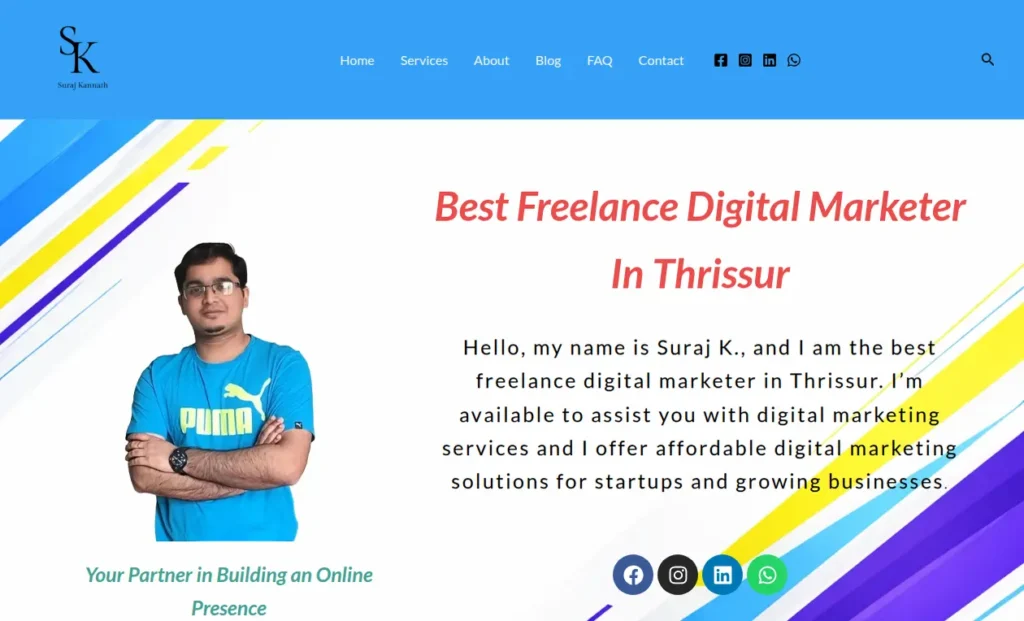
Feel free to check out www.surajkofficial.com and drop your thoughts in the comments. I’d love to hear from you about my website.
#PersonalBranding #DigitalMarketing #WordPress #Elementor #Figma #WebDesign #MarketingTips #BuildInPublic #CareerGrowth #Hostinger